ESSENTIAL WALKTHROUGH
Create a quote. Keep the work and price clear.
Prepare a branded quotation for your gas or heating work in Essential.
Create your free account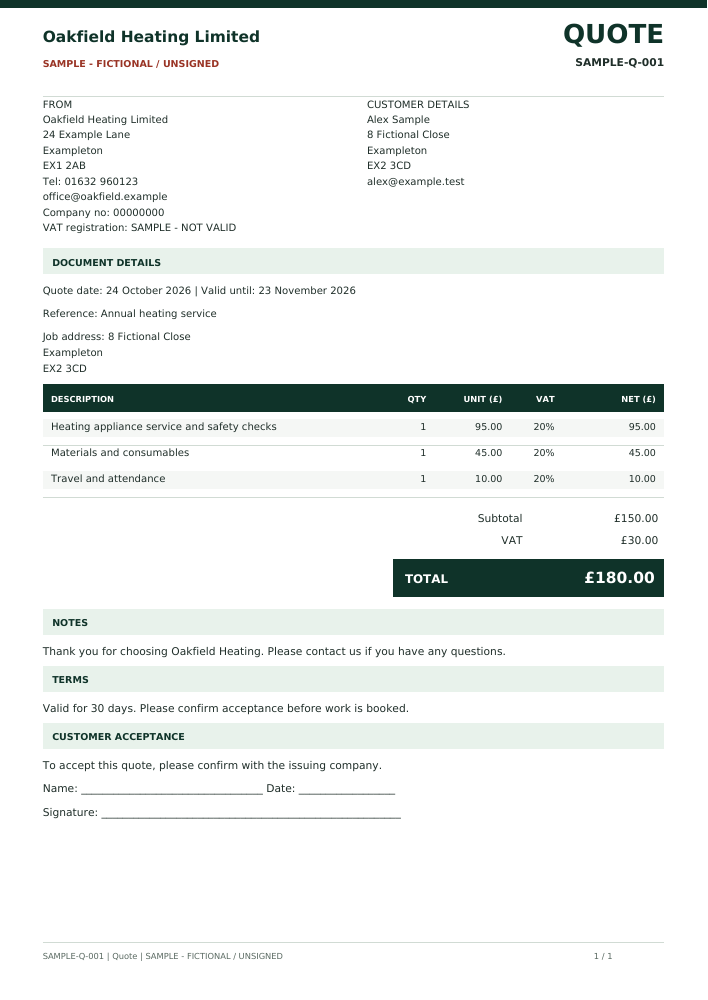
Fictional quotation sample. Original A4 output; additional pages are included in the PDF where needed.
Follow the workflow
- Save your business name, address and contact details in Company setup.
- Open Quotes & invoices and choose a new Quote. Enter the customer details and job address.
- Add line-item descriptions, quantities and prices. Use VAT only where appropriate for your business and add the required VAT information.
- Set the quote validity date, notes and terms. Save the draft while you prepare it.
- Review and issue with an eligible package, then download the numbered A4 PDF or send through your connected company email. If the work proceeds, create an invoice draft from the issued quote and review it separately.
Prepare free; issue with the package
Free accounts can save supported drafts. Issuing numbered customer documents and downloading their PDFs requires a paid subscription or an applicable access grant. Sample PDFs shown here are fictional, unsigned examples, not customer records.
Before you choose
Can I return to a draft?
Yes. Save the supported draft in your account and reopen it in the matching workspace. Review the details before issuing; a sample PDF is not an editable draft.