Your next job. Your own branded paperwork. Try Essential free for seven days. No card required. Up to two engineers.
Start your free trial ↗How the trial worksGAS ENGINEER INVOICE SOFTWARE
Your work. Your invoice. Your company.
Give customers a clear record of the work and amount due, with your business details on the A4 invoice. Quotes, invoices and certificates share one Essential account.
Create your free account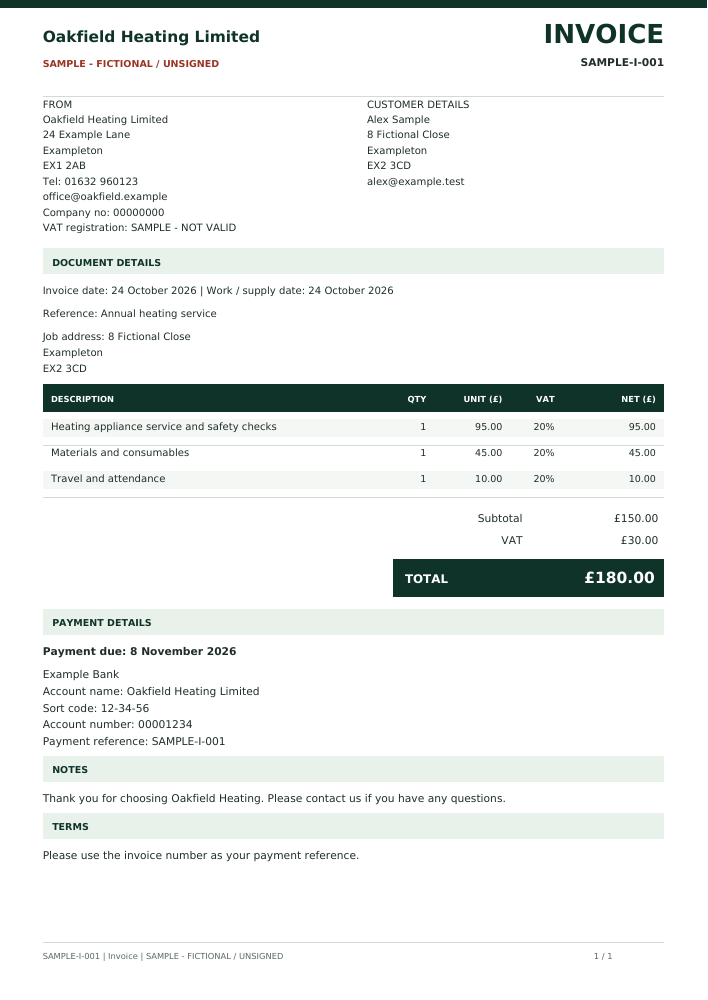
View the fictional invoice PDF. Original A4 output; additional pages are included in the PDF where needed.
What you can record
- Customer and job details, quantities, unit prices and itemised totals
- Optional VAT settings with the business VAT number when applicable
- Same day, 15, 30 or 90 days, or a custom due date
- Saved bank details, or Paid by cash on site with zero balance and no bank details
- Separate invoice numbers and an issued snapshot
From completed work to invoice
Open Quotes & invoices, choose Invoice and select your payment terms. Add the work and totals, review the document and issue it when ready. If cash was already received, choose Paid by cash on site and record the date.
Free drafts. Paid document features.
A free Essential account can save supported quote and invoice drafts. The paid package includes issuing numbered documents, PDF downloads and sending through a connected company email. Applicable existing access grants are honoured.
Google sign-in is available for supported Gmail connections. Other supported email setups may need provider-specific configuration. Connecting a mailbox is optional; you can download the PDF instead.
Know what the document does
A due date records the terms you choose; Essential does not automatically collect your customer’s payment or send overdue reminders. The cash-paid option records a payment already received.
An invoice for each way a job finishes
Create an invoice independently, or use an issued quote as the starting point for a new invoice draft. Review the items and payment terms before issuing; the earlier quote stays unchanged.
For payment by bank transfer, new invoices use the saved company bank details. For cash already received on site, choose the cash-paid option: the invoice shows a zero balance and omits bank details. This records a payment; it does not collect one.
Try the full paperwork package for seven days
Try the Essential package free for seven days, with no card details and up to two engineers. Confirm your email, save your real company details and start the trial from Your account. After seven days, a subscription is required for new numbered documents, PDFs and sending. Your saved work is preserved. One trial per company; changing email does not create a new entitlement.
Set up your free trial See monthly and annual prices Watch the actual Essential workflow
Use a completed certificate as your starting point
Open the certificate in My documents and choose Create quote for this customer or Create invoice for this customer. Essential opens a new draft with the customer name, contact details, property address and certificate reference.
Check that the copied person and address are the correct billing recipient. Add your items and prices, review VAT and payment or validity terms, and save the draft before issuing. Technical findings, signatures and charges are not copied; the original certificate stays unchanged.
Start free. Issue with Essential.
Create a free account to save supported drafts. Issuing numbered customer documents and downloading the relevant PDFs/reports requires an active seven-day trial, paid package or an applicable existing access grant. Public sample PDFs contain fictional data and are free to view.
Before you choose
Is this a free invoice generator?
Draft saving is free. Numbered customer documents and PDF downloads are included in the paid Essential package, unless your account has a legitimate access grant. You can download the fictional public samples without paying. An eligible company can also start a seven-day package trial without a card. The trial must be started explicitly after email confirmation and company setup.
Do I need to enter my company details every time?
Save your company information in Company setup. New documents use those saved details. Invoice bank details and default payment terms can also be stored there. Keep this information accurate before issuing documents.